
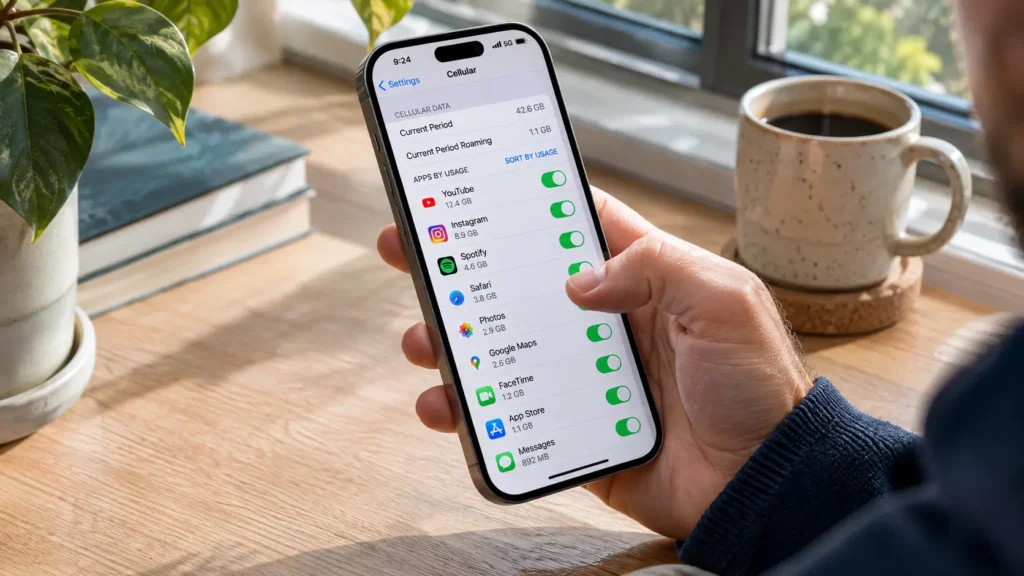
Open Settings → Cellular, then scroll to Current Period to see how much mobile data your iPhone has used. Below the total, you’ll find the amount each app has used. Depending on your region, the Settings menu may be called Mobile Data, Mobile Service, or Mobile. If you’re checking whether you have enough data left before your plan renews, also check the Last Reset date. Your iPhone’s counter can cover a longer period than your bill.
Check your total and per-app data usage in Settings
- Open Settings on your iPhone.
- Tap Cellular or its regional equivalent. On a dual-SIM iPhone, check which line is selected under Cellular Data or Mobile Data.
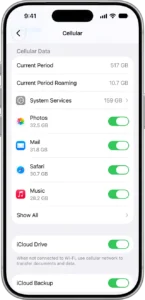
- Scroll down to the data usage section. Read the number beside Current Period. This is the amount of data your phone has counted over the cellular network during the displayed period. Traffic carried over Wi-Fi is excluded.
- Look below the total for the app list. The amount beneath each app name tells you how much cellular data that app used. Tap Show All if you only see a short list.
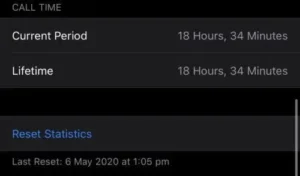
- Scroll to the bottom and look for Last Reset. Read the date before tapping anything. You can check usage as often as you like without resetting the counter.
How much data have I used this month?
Start with the date your data allowance renews. If your plan renews on the 15th, “this month” means the period from the 15th through the 14th of the following month. The date you pay your bill may be different. For a prepaid or travel package, look for the bundle’s activation and expiry dates in your provider account.
Next, compare the start of that period with Last Reset on your iPhone. Here’s how to interpret what you find.
| What Last Reset shows | What Current Period tells you |
|---|---|
| You reset the counter when the allowance renewed | The total is a useful estimate of cellular usage on that iPhone since renewal. |
| You reset it before the allowance renewed | The total includes some usage from an earlier billing cycle. |
| You reset it after the allowance renewed | The total leaves out usage between renewal and the reset. |
| It says Never, or you can’t establish the start date | Open your carrier account for a figure tied to the plan’s dates. |
To check how much data you have left, sign in to your carrier’s app or website, choose the correct phone number, and open its usage or allowance section. Read the label carefully. Data used tells you how much of the allowance you’ve spent. Data remaining tells you how much you can still use. On a shared plan, also check whether you’re looking at one line or the whole account. Apple recommends contacting your carrier for the most accurate usage figure for a billing period.
Example: Your 10 GB plan renews on the 15th, but your iPhone shows 18 GB
Suppose it’s November 26. Your plan includes 10 GB, and your iPhone shows 18 GB beside Current Period. Before buying an add-on, scroll down. If Last Reset says October 3, the iPhone has been counting for weeks longer than your current plan period. The 18 GB figure alone can’t tell you whether you’ve exceeded your allowance.
Now open your carrier account and choose the period November 15 to December 14. Suppose it shows 6.2 GB used out of 10 GB for your line. That leaves 3.8 GB based on usage the carrier has recorded so far. All dates and amounts in this example are illustrative.
If you want your iPhone to track the next cycle from the start, save a screenshot of the existing figures. On December 15, once your allowance renews, go to Settings → Cellular, scroll to the bottom, and tap Reset Statistics. Confirm if prompted. Resetting starts a fresh count on the phone. Your carrier’s usage record and remaining allowance stay the same. A recurring reminder on the 15th makes the next comparison easier. Apple Support
Find out why one app is using so much data
Start with the app showing the largest amount and consider what you used it for during the dates the counter covers. A video app that has used 4 GB since yesterday deserves a closer look. The same 4 GB accumulated over six months tells you much less about this week’s spike. If you want to investigate today’s activity without losing the rest of the month’s figures, take a screenshot now and compare the app’s number again tonight.
Suppose a video app keeps using data on your commute. Open Settings → Cellular, find the app, and turn off the switch beside its name. On mobile data alone, the app can no longer stream a new video. When you connect to Wi-Fi, you can stream again. The amount already shown under the app stays in the counter, so seeing the old figure after switching access off is normal. Other apps, such as Maps or Messages, keep their own settings. Apple Support
If you sometimes want to watch away from Wi-Fi, check whether the app offers a lower streaming quality or a Wi-Fi-only download option. That gives you more flexibility than disabling cellular access for the entire app. If you’ve also found an old app you no longer use, Teche Time explains the difference between hiding it and deleting it in How Do I Remove Apps From My Phone?.
Troubleshooting unexpected iPhone data usage
Why are the iPhone and carrier totals different?
Check three details first: the dates, the phone line, and when the carrier last updated its figures. Even when the dates match, a provider may still be processing recent usage. In the United States, for example, AT&T says data can take two to five days to appear in an account, and roaming records can take longer. If you’re close to your limit, check when the balance was updated before starting a large download. Other networks have their own reporting schedules.
If the iPhone total looks high but none of your usual apps accounts for it, open System Services on the Cellular screen. It shows data used by iOS services. Also check Personal Hotspot if you recently connected a laptop or tablet to your phone. A download on that device can use your iPhone’s mobile connection even though you never opened the file on your phone.
Which line should I check on a dual-SIM iPhone?
Go to Settings → Cellular → Cellular Data, or Settings → Mobile Service → Mobile Data, and read the selected line. It might carry a label such as Personal, Business, or Travel. Apple says the displayed usage corresponds to the selected cellular data number. If you changed lines during the month, today’s selection alone won’t establish which plan carried an earlier session. Check each provider account for the dates in question.
For a travel eSIM, check the package itself before purchasing more data. For example, Airalo directs users with a My eSIMs tab to select the relevant eSIM and read the remaining-data bar where available. This is especially helpful if you’ve returned home and switched your iPhone back to your everyday line.
Where can I see roaming usage after travelling?
Under Settings → Cellular, look near Current Period for Current Period Roaming. Data roaming means your phone used a mobile network outside your carrier’s own coverage. The roaming figure shows how much data the phone counted while roaming during that period. Whether you owe extra depends on the plan and destination. Some plans include roaming.
Check Last Reset here too. If you took two trips since the reset, the roaming counter can include both. To investigate a charge from one trip, look up those travel dates with the provider for the line you used. Save the figures before resetting, especially if you’re waiting for a roaming charge to appear.
FAQs
Does Current Period reset automatically every month?
Don’t assume it resets on your renewal date. Check Last Reset and compare it with the start of your plan period. If your counter spans several cycles, you can reset it manually when your next allowance begins. For the cycle already underway, use your carrier account.
Why did cellular usage increase when I thought I was on Wi-Fi?
One setting worth checking is Wi-Fi Assist. When enabled, it can use mobile data if your Wi-Fi connection is poor. Scroll down in Settings → Cellular to find it. If you have a small prepaid allowance and would prefer to wait for a stronger Wi-Fi signal, you can turn it off.
Can I check how much data I used today without resetting anything?
Yes, if you have a starting figure. Record Current Period in the morning and subtract it from the evening reading, keeping the same data line selected. For example, a rise from 2.1 GB to 2.7 GB means the phone counted approximately 0.6 GB in that interval. You can do the same with one app. Without an earlier reading, check whether your carrier offers a dated usage breakdown.
Final words
If you’re deciding whether you can stream another film before renewal, check your remaining allowance with your carrier. If you’re trying to understand where your data went, open Settings → Cellular, read Last Reset, and look at the app totals. Those two checks answer different questions, and together they help you decide what to change before your next bill.