
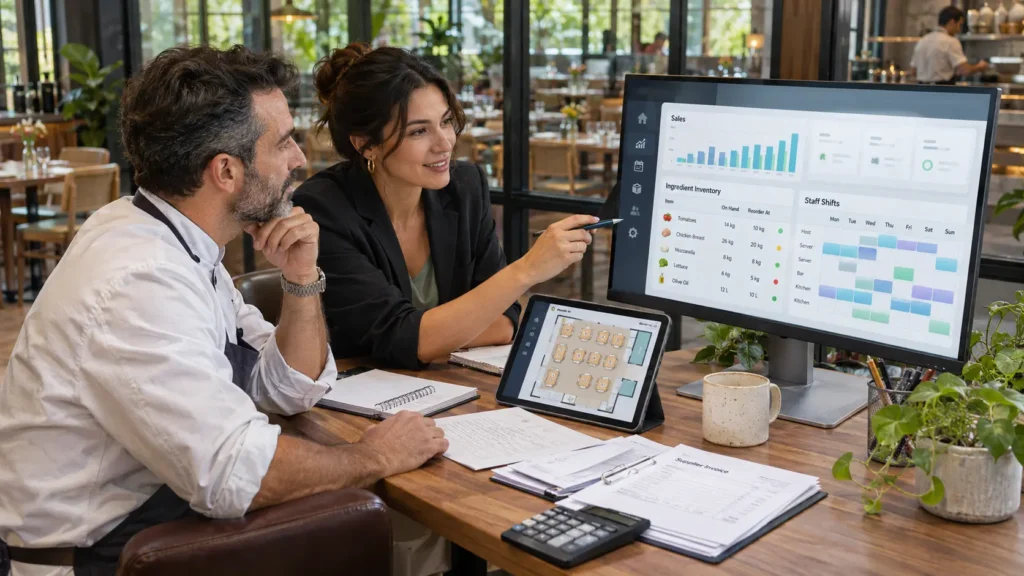
The best restaurant management software depends on where your operation needs help. Square is a practical starting point for cafés and small counter-service businesses; Toast and TouchBistro suit restaurant service workflows; Lightspeed deserves attention for more complex operations; Restaurant365 focuses on back-office control; and 7shifts specializes in staff management.
Start with your biggest operational problem. Missed kitchen tickets require a different solution from unexplained ingredient losses or last-minute scheduling gaps. Buying more features will not necessarily solve any of them.
This guide draws on official product information rather than firsthand testing. Recommendations reflect business fit, not a universal ranking. Prices were checked on November 10, 2026; published US prices are reference points, with local terms and availability requiring confirmation.
Restaurant Management Software at a Glance
| Software | Strong starting point for | Platform type | Pricing guidance |
|---|---|---|---|
| Square | Cafés, takeaway counters, small restaurants | POS and business tools | US Free: $0; Plus: $49; Premium: $149 monthly per location |
| Toast | Restaurants wanting connected service tools | Restaurant POS platform | US Starter Kit from $0 monthly; Point of Sale from $69 monthly |
| Lightspeed Restaurant | Operators needing detailed service and reporting workflows | Restaurant POS platform | US page lists Starter $69, Essential $189, Premium $399 monthly |
| TouchBistro | Table-service restaurants | Restaurant POS platform | POS from $69 monthly; hardware and other fees apply |
| Restaurant365 | Groups prioritizing accounting and food-cost control | Back-office management platform | Custom quote |
| 7shifts | Restaurants improving scheduling and team coordination | Workforce specialist | Free entry option and paid plans; confirm current limits and pricing |
These are software starting points, not complete operating costs. Hardware, payment processing, implementation, integrations, and optional modules can change the total substantially. Official pricing sources support the figures above.
What Does Restaurant Management Software Do?
Restaurant management software connects the tasks involved in running a food business: taking orders, coordinating the kitchen, accepting payments, tracking supplies, scheduling employees, and reviewing performance.
The category includes three different types of products:
- POS-centered platforms: Manage transactions and service, with additional operational modules.
- Back-office platforms: Connect sales data with inventory, purchasing, accounting, and labor costs.
- Specialist tools: Handle a particular task, such as reservations or staff scheduling.
A broad platform may still require paid modules or third-party integrations. “All-in-one” does not mean every feature is included.
For a closer look at checkout fundamentals, read our POS system software guide.
6 Restaurant Management Software Options Worth Shortlisting
1. Square: For Cafés and Smaller Counter-Service Businesses
Square is worth considering when you need to organize orders and payments without immediately committing to a large software subscription. Its US plans include Free, Plus, and Premium, with paid subscriptions charged per location. Hardware and some services are separate. Square
For a café, the useful test is straightforward: enter a drink with several modifiers, add food, accept payment, and route preparation instructions correctly. Then test the same workflow with an online order arriving simultaneously.
Main limitation: Payment processing is available in the US, Canada, Australia, Japan, UK, Ireland, France, and Spain. Payments use the seller’s local currency; accepting overseas customers does not mean businesses worldwide can open processing accounts.
Check ingredient-level inventory separately. Tracking finished products is different from deducting milk, coffee beans, and syrup from recipes.
2. Toast: For Connected Restaurant Service Operations
Toast deserves a place on the shortlist when you want a restaurant-focused POS with related service and management products. Its US pricing page lists a Starter Kit from $0 monthly and a Point of Sale plan from $69 monthly, alongside custom packages. Review processing and hardware terms before interpreting the entry price as the total cost. pos.toasttab.com
During a demonstration, ask staff to handle a dinner-rush scenario: split a check, change a modifier, send courses separately, and manage takeaway orders alongside seated guests.
Main limitation: Regional product differences are significant. Toast’s documentation covers Australia, Canada, Ireland, and the UK, but identifies Toast Payroll, xtraCHEF, and several other products as US-only. An international restaurant should not assume it receives the US product bundle.
Request a written list of the exact products, devices, and integrations included in your local offer.
3. Lightspeed Restaurant: For Detailed Operational Workflows
Lightspeed Restaurant offers menu and floor-plan tools, reporting, multi-location capabilities, and optional operational services. Its US pricing page lists three standard tiers and a custom enterprise option. Advanced inventory is also available as an add-on, while the kitchen display system carries a separate per-screen charge. Lightspeed Commerce
It is worth evaluating when managers need clearer visibility across service areas or locations. Ask the vendor to demonstrate location-specific menus, permissions, and reporting using a structure similar to your business.
Main limitation: Product editions, packages, payment arrangements, and integrations need regional verification. Request the exact edition name so that documentation and demonstrations match what you will purchase.
For delivery operations, test menu updates, sold-out items, order routing, and refunds. A connection that imports orders may not synchronize every other action.
4. TouchBistro: For Table-Service Restaurants
TouchBistro’s core POS includes menu management, floor plans, tableside ordering, staff management, and reporting. Its published starting price is $69 monthly, with hardware, processing, and additional fees separate. Reservations, inventory, kitchen displays, and online ordering are optional additions. TouchBistro
That makes it a useful candidate for restaurants where table assignments, bill splitting, and coordination between servers and the kitchen matter most.
A floor plan is not the same as a reservation system. Demonstrate booking changes, walk-ins, waitlists, and table transfers before purchasing both.
Main limitation: Confirm each module’s regional eligibility. TouchBistro’s online-ordering documentation specifies Canada and the continental US, with US territories excluded; eligibility should be checked for the actual restaurant address.
Also confirm supported hardware models and whether your preferred payment processor integrates directly or requires a separate terminal workflow.
5. Restaurant365: For Accounting, Purchasing, and Food-Cost Control
Restaurant365 brings together restaurant accounting, inventory and purchasing, workforce management, and payroll offerings. Its current main pricing page directs buyers to request a custom quote. restaurant365.com
It belongs on the shortlist when sales data already exists but managers struggle to connect it with invoices, ingredient usage, and financial results. Treat it as a back-office investment alongside your POS requirements.
For example, a restaurant group could investigate whether worsening margins come from supplier price changes, recipe portions, waste, or transfers between locations.
Main limitation: Implementation requires clean records and clear ownership. Incorrect purchase units or incomplete recipes produce misleading reports.
Outside your primary operating market, verify accounting localization, bank connections, currencies, payroll coverage, and local implementation support before committing.
6. 7shifts: For Scheduling and Team Coordination
7shifts focuses on restaurant workforce tasks, including scheduling, time clocking, team communication, and related management tools. It offers integrations with restaurant POS and payroll platforms. 7shifts.com
It is a useful option when your POS works adequately but managers still organize shift changes through scattered messages.
Test employee availability, time-off requests, shift swaps, approval permissions, and the movement of worked hours into payroll.
Main limitation: It is a workforce specialist, so you will still need systems for orders, payments, inventory, and reservations. Confirm regional payroll and tip-payment eligibility separately from scheduling access.
Check subscription terms carefully: 7shifts states that selected plans and add-ons apply across account locations, which matters when different branches need different capabilities.
Features That Matter During Real Restaurant Work
Orders, Kitchen Displays, and Delivery
A kitchen display system should make preparation clearer. Ask how it handles modifiers, course timing, station routing, recalled tickets, and delayed items.
Cloud kitchens should prioritize delivery coordination over dining-room features. Test the delivery platforms used locally—such as Uber Eats, DoorDash, Deliveroo, or foodpanda—rather than accepting a generic “delivery integration” claim.
Check whether the connection needs middleware, who charges for it, and which company handles support when orders stop arriving.
Ingredient Inventory, Recipe Costing, and Purchasing
Useful inventory control goes beyond counting menu items. Ask for:
- Recipe ingredients and portion quantities.
- Purchase-unit conversions, such as cases into kilograms.
- Preparation yields and batch recipes.
- Waste, staff meals, and location transfers.
- Purchase orders and supplier invoice matching.
Suppose 100 portions should consume 15 kilograms of chicken, but stock records show 18 kilograms used. The three-kilogram difference is a signal to investigate portions, waste, counting, or recipe setup—not automatic evidence of theft.
Recipe cost is also not the same as menu profitability. Packaging, delivery charges, labor, and other expenses still matter.
Staffing and Useful Reporting
Scheduling should connect employee availability with the workload you expect. Give managers visibility into scheduled hours, actual hours, and overtime warnings where supported.
Start reporting with questions that lead to action:
- Which items sell well but contribute little after ingredient costs?
- Which shifts have excessive labor relative to sales?
- Where are voids, refunds, or waste increasing?
- Are delivery sales profitable after channel costs?
Use consistent definitions across locations. Otherwise, attractive dashboards can hide unreliable comparisons.
Check Regional Fit Before Booking a Demo
Worldwide availability requires more than access to a website.
Ask each vendor to confirm:
| Requirement | What to verify |
|---|---|
| Merchant eligibility | Your registered country, business type, and settlement bank |
| Currency | Transaction, settlement, subscription, and reporting currencies |
| Languages | Staff interface, kitchen tickets, receipts, and customer ordering |
| Tax setup | Applicable tax-inclusive pricing, receipt fields, and required local integrations |
| Payments | Supported processors, local methods, refunds, and payout terms |
| Delivery | Exact local platforms, connector costs, and supported actions |
| Support | Language, time zone, weekend coverage, and escalation route |
Request sample receipts and reports for your jurisdiction and have your accountant check their suitability. A configurable tax field alone does not establish that the full system meets local requirements.
Understand the Full Cost Before Signing
Build your budget from separate components:
- Software subscriptions per location, terminal, or employee.
- Payment processing by transaction type.
- Hardware purchases, leases, or financing.
- Setup, menu import, training, and migration.
- Optional modules and integration charges.
- Support upgrades and cancellation obligations.
For illustration, a hypothetical restaurant might pay $100 for its core subscription, $60 for two kitchen screens, $80 for inventory, and $40 for scheduling. That is $280 monthly before payment processing, hardware, taxes, and setup.
Use your actual transaction mix to assess payment costs. A guide to payment processing companies explains the fee structures to examine.
Test Hardware, Offline Operation, and Onboarding
“Offline” needs a precise definition. Taking orders, printing kitchen tickets, recording cash, and accepting card payments are separate capabilities.
Ask the vendor to disconnect the internet during a demonstration. Check what continues, what stops, how devices communicate, and how transactions synchronize afterward. Obtain the conditions and liability terms for any offline card acceptance.
Before launch, confirm:
- Compatible terminals, tablets, printers, routers, and kitchen screens.
- Who imports menus, modifiers, recipes, and opening stock.
- Training for servers, kitchen staff, and managers.
- Support availability during your busiest shifts.
- Export access for sales, customer, inventory, and accounting records.
Pilot one location or service period first. Record issues and resolve them before expanding.
FAQs
What is the best restaurant management software for a small restaurant?
Start with the most important workflow and local eligibility. Square merits consideration for simple counter service, while Toast and TouchBistro deserve evaluation for restaurant-focused service. Test your own menu before choosing.
Can I keep my existing POS?
Often, yes. A workforce or back-office tool may solve the problem through integration. Verify exactly which data transfers, how frequently it updates, and whether refunds and corrections synchronize.
Does restaurant software automatically reduce food costs?
No. It can reveal discrepancies, but results depend on accurate recipes, stock counts, purchase records, and staff routines. Managers must act on the findings.
Do restaurants need reservation software?
Reservation-led restaurants may benefit substantially. A takeaway counter or delivery-only kitchen may have little reason to pay for it. Buy according to the service model.
Final Words
Choose restaurant management software around the work your team needs to improve. Shortlist two or three eligible providers, request complete quotes, and run realistic service tests.
The strongest choice is one your staff can operate confidently during a rush—and your managers can use to understand costs afterward.